
How to Keep Track of Bills: A Simple 6-Step System
By Todd Lahman ·
To keep track of bills, list every bill you pay with its amount and due date, put them all on one calendar next to your paydays, set a reminder a few days before each one is due, and check each bill off when it's paid. The Consumer Financial Protection Bureau (CFPB) says you may be able to avoid late fees if you set up a bill calendar so you can see when payments are due (CFPB). Here's how to build that system in six steps, and what to do in a month when the money doesn't stretch to every bill.
Step 1: Gather every bill you pay
Start with a complete list, because a bill you forget is the one that comes due by surprise. The CFPB suggests gathering all the bills you pay in one month and remembering to include any bills that are paid automatically (CFPB).
Where to look:
- Your last two or three bank and card statements. Every regular payment shows up there, including the ones on autopay.
- Your email and mail. Utility, phone, insurance and loan statements.
- Bills that come once or twice a year. Car insurance, renewals and memberships are easy to miss on a monthly list.
- Subscriptions. Streaming, apps, software and memberships. The Federal Trade Commission (FTC) warns that an automatic renewal might charge more than you paid last time, for example after a promotional rate ends (FTC).
Step 2: Write down what each bill needs
For each bill, record who you pay, how much, and when. The CFPB's advice is to write down what each bill is for, the amount owed, and the due date (CFPB). A few more details save trouble later:
| What to record | Why it matters |
|---|---|
| Who you pay | So you can find the account or call the company |
| Amount | Note whether it's the same each month or changes |
| Due date | The day the payment has to arrive |
| Pay-by date | A few days earlier, so the payment arrives on time |
| How you pay | Autopay, online, by phone or by mail |
| Which account it comes from | So that account has enough in it on the day |
The pay-by date matters because a payment counts when it arrives, not when you send it. For a bill you pay by mail, the CFPB suggests putting the pay-by date on your calendar at least seven days before the due date, and for one you pay online or in person, two or three days before (CFPB).
Step 3: Put your bills on one calendar, next to your paydays
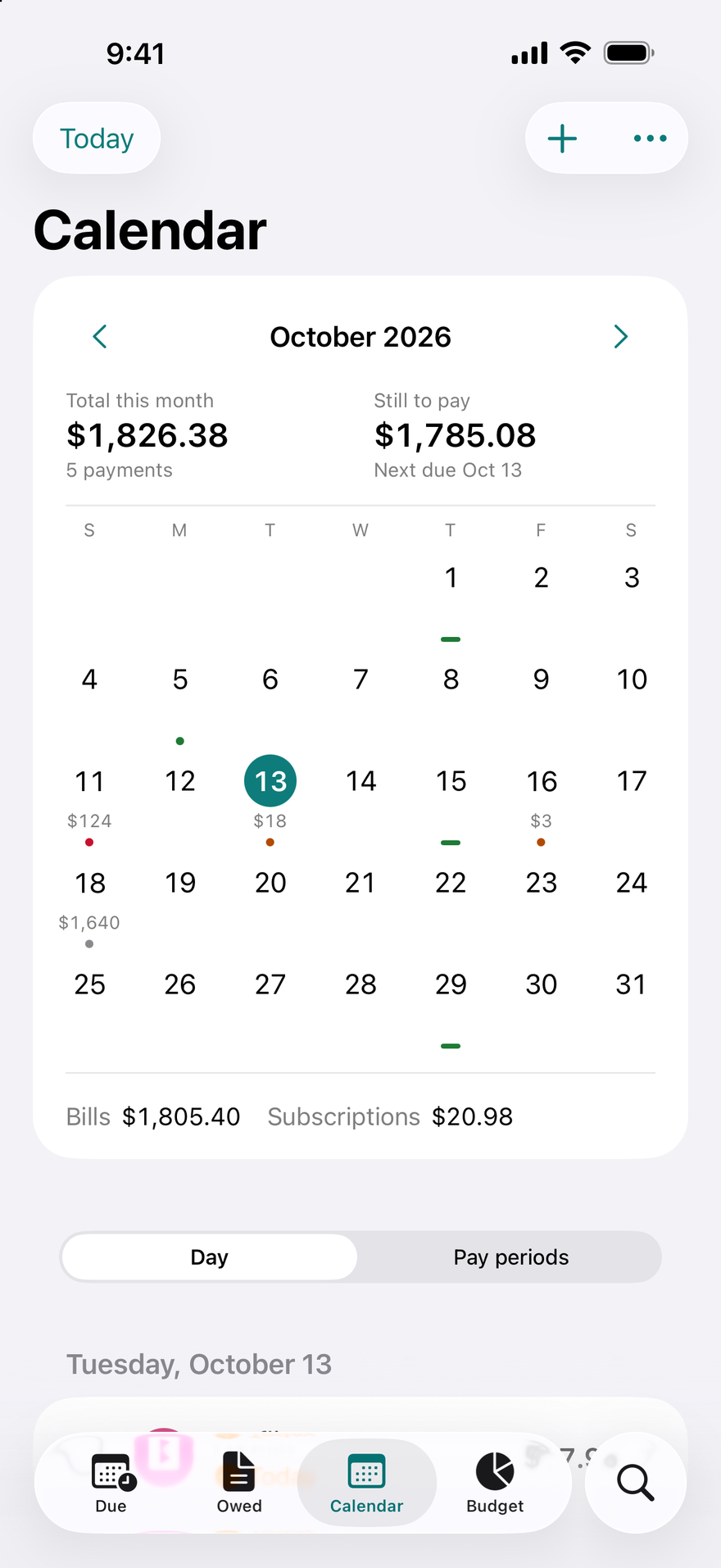
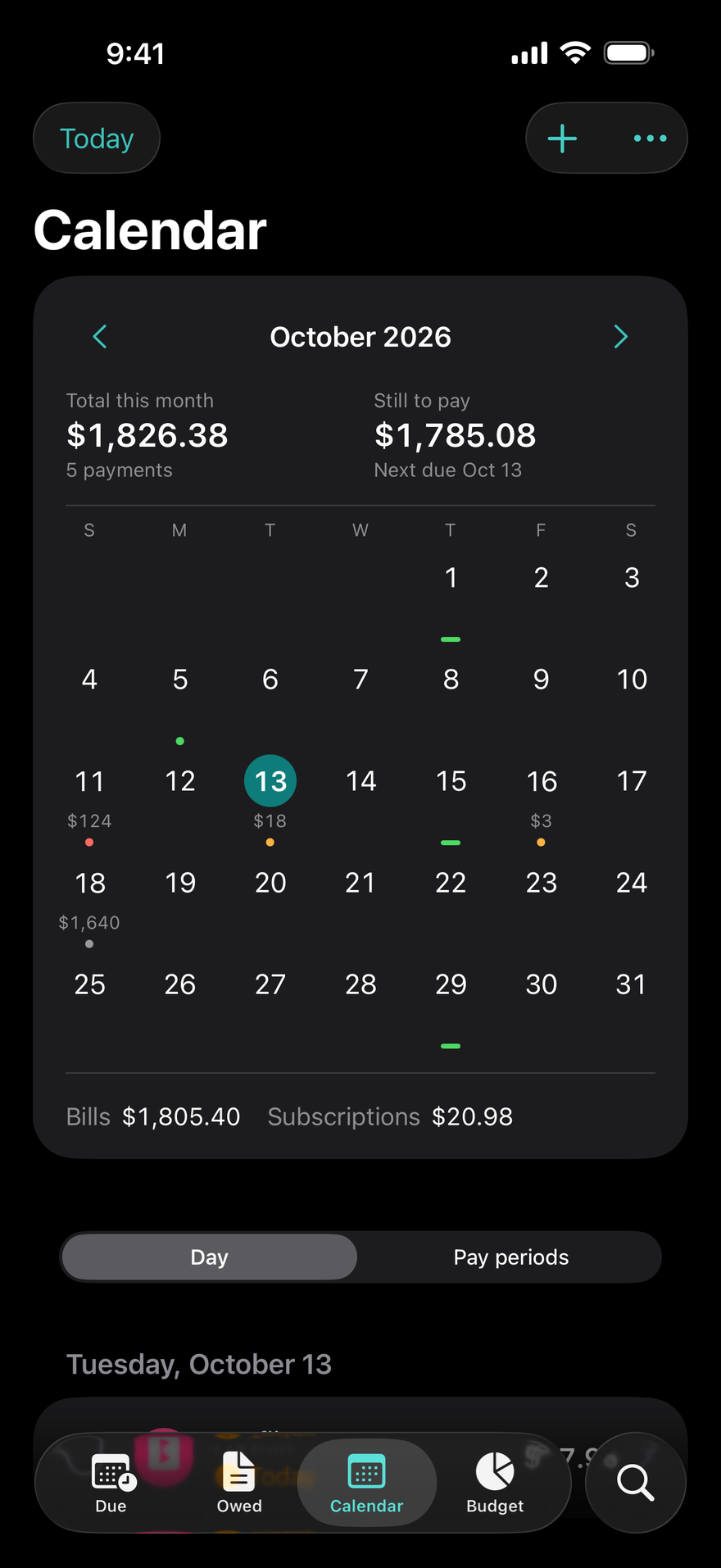
A bill calendar works best when it shows your income too. Once your bills are on it, the CFPB suggests adding the dates and amounts you get paid, then comparing each week's bill total with that week's income (CFPB). A week with more bills than income shows up right away.
If one week is always short, ask to move a due date. The CFPB notes that many creditors may be willing to shift the due date to line up with when you get paid, if you ask (CFPB). A credit card's due date stays put once it's set: under federal rules it must be the same day of the month for each billing cycle (12 CFR 1026.7).
Where to keep your calendar:
- On paper. The CFPB's printable bill calendar suggests putting it where you will see it every day.
- In a spreadsheet. One row per bill with the columns from Step 2. The Spreadsheet Builder on this site makes a bill tracker you can download as CSV or Excel, in your browser.
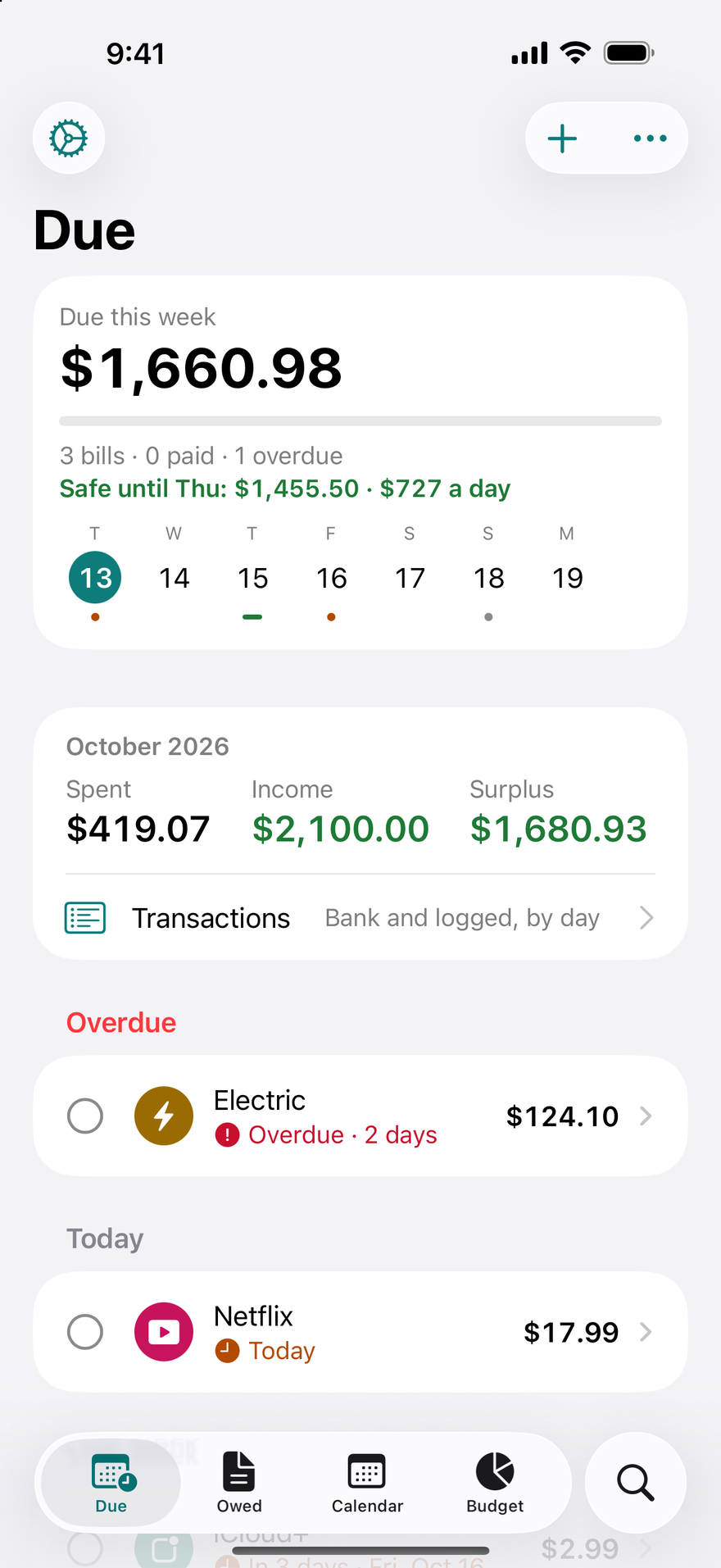
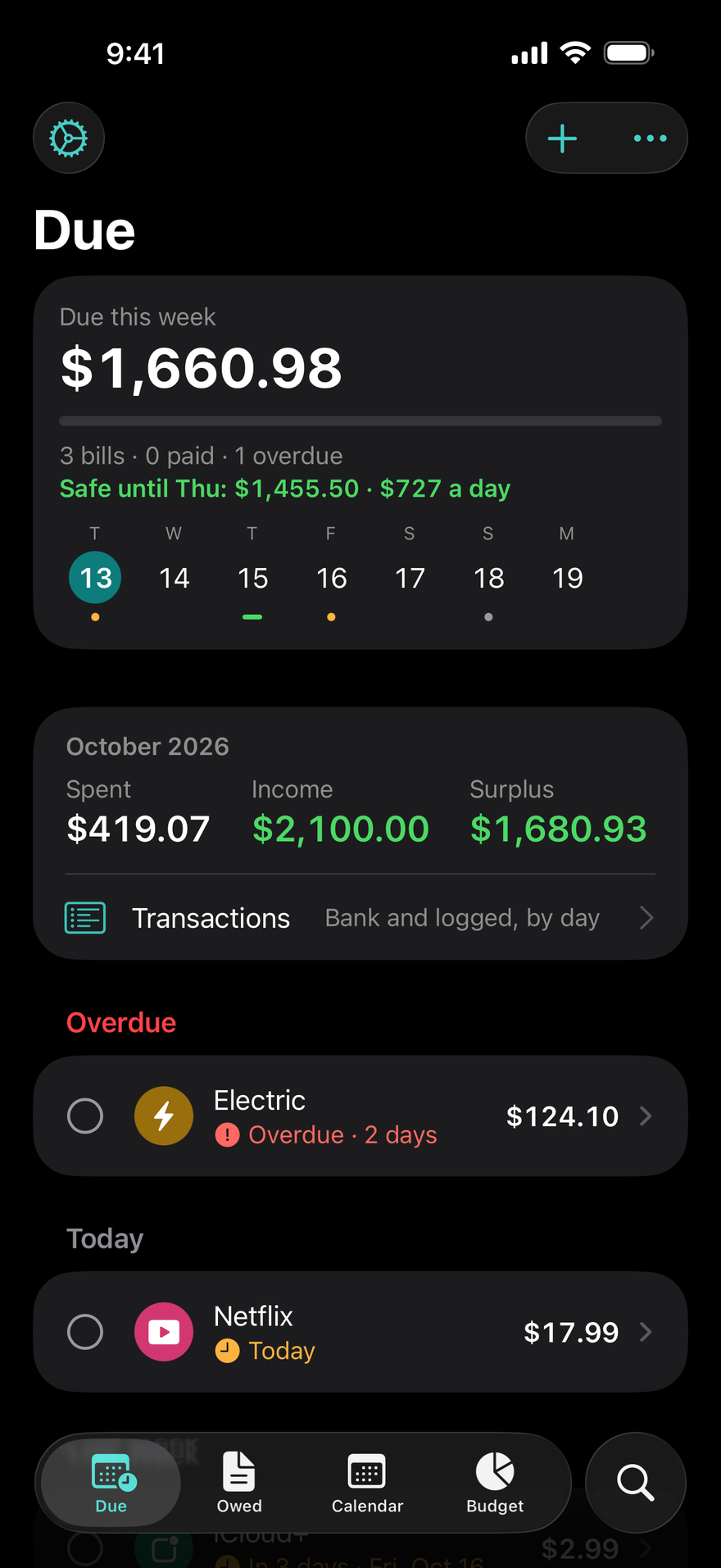
- In an app. An app can remind you, which paper can't. DueBy puts each bill's due dates on a calendar with your paydays, and its Due screen shows what's safe to spend until payday after the bills that come first.
Step 4: Set reminders before each due date
A reminder a few days ahead gives you time to pay before the pay-by date. The CFPB lists setting up automatic payments or electronic reminders as helpful ways to make sure your payments are on time (CFPB).
For credit cards, the exact time matters. The CFPB explains that a card company generally can't treat a payment as late if it's received by 5 p.m. on the due date, in the time zone on your statement, and that a payment has to be received by the due date, not mailed on it (CFPB).
DueBy reminds you three days before a bill is due and on the day, and you can choose other days for each bill. Mark Paid and Snooze are right in the notification, and the Due screen sorts every bill into Overdue, Today, This Week and Later.
Step 5: Decide which bills go on autopay
Autopay is a good fit for bills with a steady amount, paid from an account that always has enough in it. The CFPB says automatic payments can be a convenient way to make sure you pay your bills on time and can help you avoid late fees (CFPB).
The risk is a low balance. If your account is too low when a payment is due, you might pay overdraft or nonsufficient funds fees, and both the bank and the company might charge one, according to the CFPB (CFPB). Its advice is to watch your balance and upcoming automatic payments, and to check that the amount and timing of each transfer are what you agreed to.
So keep autopay bills on your list and your calendar too. In DueBy, a bill set to Autopay is still listed and still reminds you, and the day after it's due DueBy asks whether the payment went through.
Step 6: Check bills off and review your statements each month
Mark each bill paid as you pay it, then once a month compare your list with your statements. The FTC suggests making it a habit to review your credit card statements to keep track of your spending and spot mistakes or unauthorized charges (FTC), and to monitor your card statements so you know right away if you're charged for something you didn't order (FTC).
If you find a billing error on a credit card, act quickly. The FTC says your dispute letter should reach the card issuer within 60 days after the first bill with the error was sent to you (FTC).
The monthly review is also the moment to catch a new bill, a price increase or a free trial about to turn into a paid subscription. The FTC suggests noting on your calendar a reminder to cancel before a trial ends (FTC).
How long should you keep paid bills?
Most paid bills can go after about a year, and anything that supports your tax return stays longer. In its 2025 guide to which documents to keep and which to shred, the FTC lists bank statements, pay stubs, and credit card and utility bills under "Keep for a Year", and suggests shredding paper copies of documents you can get electronically (FTC).
Records that support income, a deduction or a credit on a tax return are kept longer. The IRS says to keep them until the period of limitations for that return runs out, which is generally 3 years, with longer periods in some situations (IRS).
What if you can't pay every bill this month?
You're not alone, and there are steps that limit the damage. In the Federal Reserve's survey of 2025, 16% of adults did not pay all of their bills in the prior month (Federal Reserve).
- Know what's at stake. The CFPB notes that if you're late, even by a few days, you will likely pay an extra fee and may risk a negative entry in your credit record (CFPB). Credit reporting companies can generally report negative payment history for up to seven years (CFPB).
- Decide the order. The CFPB's prioritizing tool suggests first identifying what you need to pay to protect your housing and income, keep your insurance, and meet any court-ordered obligations (CFPB).
- Call before you miss a payment. The same tool says not to ignore bills you can't pay, and to call the company, explain that you'll miss a payment, and say why.
- Look for help with utility bills. The Low Income Home Energy Assistance Program (LIHEAP) can help pay heating or cooling bills, and each state has its own rules on when utilities can disconnect service for non-payment (USA.gov).
For anything beyond a tight month, such as collections or a lawsuit, talk to a qualified professional or a nonprofit credit counselor.
Sources
- Consumer Financial Protection Bureau, Bill calendar (Your Money, Your Goals toolkit), 2018.
- Consumer Financial Protection Bureau, Budget help: Manage your monthly expenses with a bill calendar, 2019.
- Consumer Financial Protection Bureau, How do automatic payments from a bank account work?, 2026.
- Consumer Financial Protection Bureau, When is my credit card payment considered late?, 2024.
- Consumer Financial Protection Bureau, Regulation Z, 12 CFR 1026.7, Periodic statement.
- Consumer Financial Protection Bureau, How do I get and keep a good credit score?, 2024.
- Consumer Financial Protection Bureau, How long does information stay on my credit report?, 2026.
- Consumer Financial Protection Bureau, Behind on bills: Three steps to help you make tough choices in tight moments, 2017.
- Consumer Financial Protection Bureau, Prioritizing bills (Your Money, Your Goals toolkit), 2020.
- Federal Trade Commission, Using Credit Cards and Disputing Charges, 2022.
- Federal Trade Commission, Getting In and Out of Free Trials, Auto-Renewals, and Negative Option Subscriptions, 2024.
- Federal Trade Commission, Protecting your personal information: Which documents to keep and which to shred, 2025.
- Internal Revenue Service, How long should I keep records?, 2026.
- Board of Governors of the Federal Reserve System, Economic Well-Being of U.S. Households in 2025, 2026.
- USA.gov, Get help with energy bills, 2026.
Frequently asked questions
What is the best way to keep track of bills?
The tool matters less than the habit: one list with every bill, its amount and its due date, kept where you will see it, with a reminder before each due date. The CFPB suggests a bill calendar that also shows your paydays, so you can spot a week where bills add up to more than that week's income.
How many days before the due date should I pay a bill?
The CFPB suggests sending a payment by mail at least seven days before the due date, and paying online or in person two or three days before. A payment counts when it arrives. For credit cards, the CFPB says a payment received by 5 p.m. on the due date, in the time zone on your statement, generally can't be treated as late.
Should I put all my bills on autopay?
Autopay suits bills with a steady amount paid from an account that always has enough in it. The CFPB says automatic payments can help you pay on time and avoid late fees, but a low balance can bring overdraft or nonsufficient funds fees from both the bank and the company. Keep autopay bills on your calendar and check each payment.
Which bills should I pay first if I can't pay them all?
The CFPB suggests starting with what protects your housing and income, keeps your insurance, and meets any court-ordered obligations. It also says not to ignore a bill you can't pay: call the company before you miss the payment and explain why. Many creditors may be willing to move a due date closer to your payday if you ask.
How long should I keep paid bills?
The FTC lists bank statements, pay stubs, and credit card and utility bills as documents to keep for a year, and suggests shredding paper copies you can get electronically. Records that support your tax return stay longer: the IRS says to keep them until the return's period of limitations runs out, generally 3 years, and longer in some situations.
Get DueBy
On the App Store for iPhone, iPad, Mac, and Apple Watch.

Disclaimers
Not financial, tax or legal advice. This article is general information and education only. It is not financial, investment, tax, accounting or legal advice, and it is not a substitute for advice from a qualified professional who knows your situation, such as a CPA, an enrolled agent, an attorney or a financial adviser. The author is not a CPA, enrolled agent, attorney or financial adviser, and reading this article does not create a professional-client relationship.
Tax rules change. Tax rules, rates and limits change from year to year and differ by state and country. Unless an article says otherwise, its tax information is about United States federal tax for the years it names. Check the current rules at IRS.gov or with your tax preparer before you rely on them.
About the app. DueBy helps you track bills, subscriptions, income and spending, and with DueBy Business a business's income and expenses, from what you enter, import or receive from your bank. It does not move money, does not prepare or file a tax return, and does not provide financial, tax, accounting or legal advice. Its Tax Summary, Profit and Loss, mileage deduction and tax estimate are summaries and estimates worked out from what is in DueBy.
Accuracy. We link our sources so you can check them. This article reflects its sources as of its last update, and it may not cover every situation.
Disclosure. The author, Todd Lahman, is the developer of DueBy, the app mentioned in this article, and this site is published by Todd Lahman LLC. No one paid for this article, and it contains no affiliate links.
Government agencies, trademarks and links. DueBy and Todd Lahman LLC are not affiliated with or endorsed by the IRS or any other government agency. Other product names mentioned are trademarks of their respective owners, used only to describe their products, and DueBy is not affiliated with or endorsed by them. Links to other websites are for reference, and we don't control their content.
Use of this site is subject to our Terms of Use and Privacy Policy.